

Availability and supplier-rule imports; purchasing exports
Purchase Planner provides three separate local XLSX workflows: verified availability history import, SKU and purchase-cost rule import, and purchasing exports. Supplier-provided order forms use a different mapping workflow.
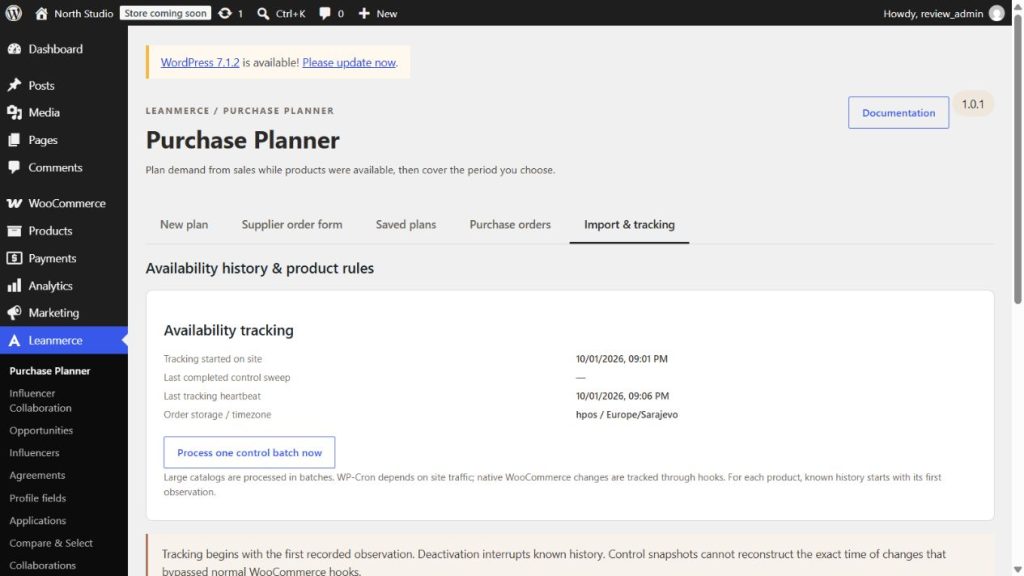
1. Verified availability history import
Use when: you have a trustworthy source for historical availability intervals that the plugin could not observe.
- Go to Leanmerce → Purchase Planner → Import & tracking.
- Select Verified availability history and download the Excel template.
- Keep headers in row one. Identify each product by SKU or product ID.
- Enter
startandendin the site timezone; start is inclusive and end is exclusive. - Use one supported state:
available,outofstock,blocked, orbackorder. Useregular,sale, orunknownfor sale state, and name a verifiable source. - Acknowledge that the data is verified, then validate and import.
Intervals for the same SKU must not overlap and future intervals are rejected. Every row must pass; otherwise nothing is written. Verify by recalculating one imported SKU and reviewing its availability durations.
2. SKU and purchase-cost rule import
Use when: pack, MOQ, supplier code, cost, currency, or related product rules need a controlled bulk update.
- Select SKU & purchase-cost rules and download its template.
- Identify each row by SKU or product ID. Supported fields include supplier SKU, pack, MOQ, minimum stock, trial quantity, cost, currency, blocked state, and note.
- Enter positive integers for pack and MOQ. Pair a purchase cost excluding tax with a three-letter currency code.
- Validate and import. Correct the workbook and retry if any row fails.
Verify by recalculating an exact-SKU plan and opening Calculation and rules.
3. Purchasing exports
Use when: a reviewed plan needs an internal analysis file or a supplier-facing workbook.
- Calculate or reopen a saved plan.
- Resolve warnings and review approved quantities, supplier codes, costs, and currency.
- Choose the intended internal or supplier-facing export.
- Open the downloaded workbook and compare it with the reviewed plan before sharing it.
Supplier-facing output omits unnecessary internal sales detail. XLSX processing is local; the plugin does not send workbooks to a remote parser.
Validation and recovery
Import files are standard XLSX up to 5 MB and 5,000 rows. Unsupported active content, external data, encryption, protected inputs, invalid headers, and formula inputs are rejected. Save a clean copy, paste required formula results as values, correct every failing row, and retry. Never rename another file format to .xlsx.
Supplier workbook: see Supplier XLSX order forms for worksheet selection, column mapping, prefixes, and unmatched items.