

Manage collaborations
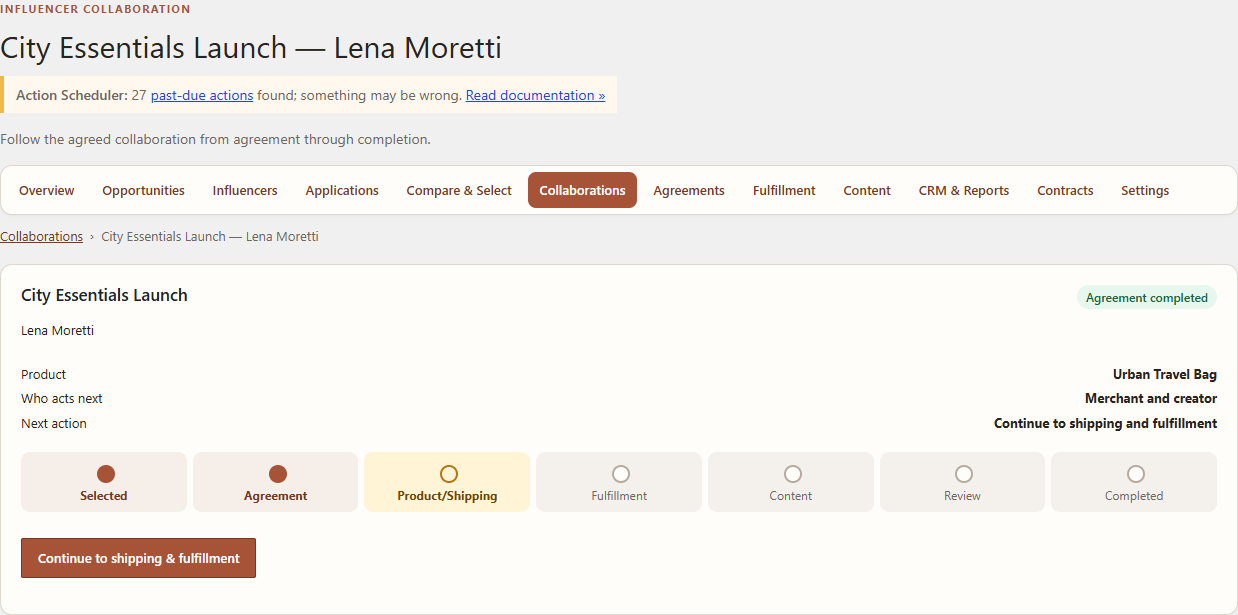
A Collaboration is created after a creator accepts a selection offer. It is the operational record for agreement, fulfillment, content and completion.
Navigation
Open WordPress Admin → Leanmerce → Collaborations and select the record.
Review the collaboration
- Confirm the Opportunity and creator.
- Review the accepted proposal and product choice.
- Check the readiness indicators for agreement, shipping, fulfillment and content.
- Move through actions offered by the current state; do not skip required prerequisites.
Typical sequence
- Record or prepare the agreement.
- Confirm the selected WooCommerce product and creator shipping details.
- Create the appropriate fulfillment record.
- Add tracking and mark shipped/delivered as real events occur.
- Start content deliverables.
- Review submissions and request revision or accept.
- Complete the Collaboration only after the operational work is finished.
Verify
The Collaboration timeline and related CRM/history retain factual events. The creator sees only the relevant collaboration information in My Account → Influencer Program.
Recovery
If the next action is blocked, open its readiness details. Correct the missing agreement, address, product or fulfillment prerequisite instead of changing status directly.
Related documentation
See Agreements and fulfillment, Review creator content, and CRM, history and reporting.