

Social accounts and analytics evidence
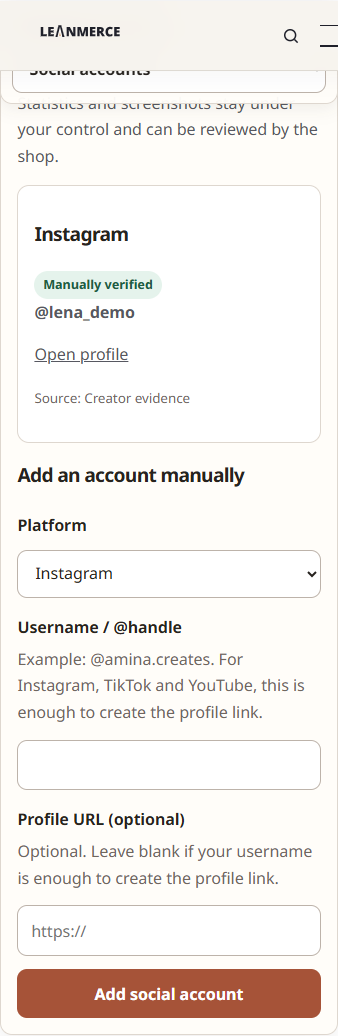
Social account records and private analytics evidence let a creator support factual information without exposing screenshots publicly.
Add a social account
- Sign in and open My Account → Influencer Program.
- Open Social accounts.
- Choose the platform and enter the account/handle information requested by the current form.
- Save and confirm the account appears in the profile.
Add statistics evidence
- Open the Statistics or evidence area for the social account.
- Enter the period and factual metric values supported by the form.
- Upload the corresponding analytics screenshot/evidence privately.
- Submit for merchant review.
There is no creator manual follower-count profile field used as a shortcut. Historical statistics are recorded with evidence and remain self-reported until merchant verification.
Privacy
Evidence files are private operational data. They are not product screenshots and must not be reused on public product or documentation pages without separate approval and sanitization.
Verify
The creator can see the submitted record and its review state. The merchant can inspect and verify or correct it through the authorized workspace. Public visitors cannot retrieve the evidence URL.
Provider boundary
Live Instagram, TikTok and YouTube provider connections are unavailable until separately validated and enabled. Manual records remain the supported path.
Related documentation
See Privacy and private creator data and CRM, history and reporting.