

Products, eligibility and application settings
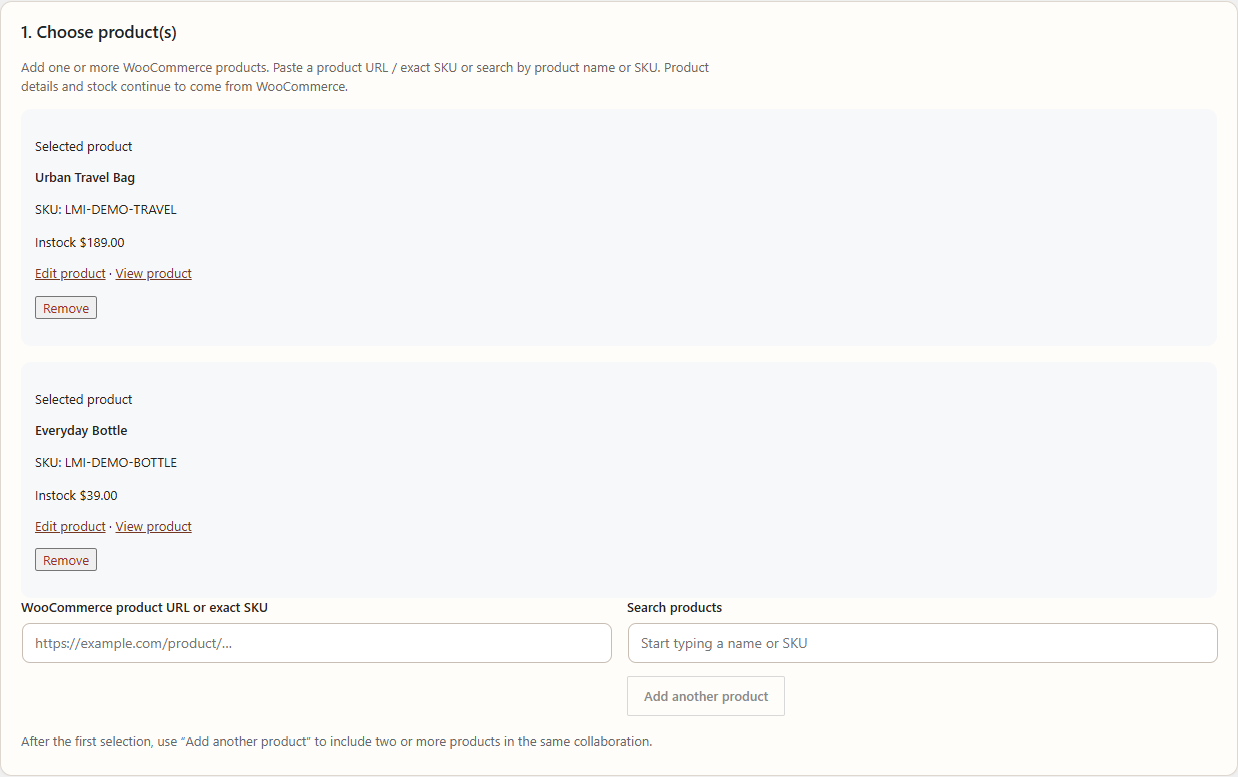
Use Opportunity settings to define product context and objective eligibility without turning the system into a recommendation engine.
Add WooCommerce products
- Open Leanmerce → Opportunities and edit the Opportunity.
- In Products, search by product name, URL or SKU.
- Add Urban Travel Bag and Everyday Bottle for the multi-product walkthrough.
- Confirm each selected product resolves to the intended WooCommerce product.
- Save, reopen and verify both products remain linked.
The selected products provide creator-facing context and later fulfillment choices. They do not create an order by themselves.
Set eligibility
- Choose eligible countries only when the Opportunity is geographically restricted. No selection means all countries.
- Choose eligible platforms from Instagram, TikTok, YouTube or Other as appropriate.
- Set application start/end dates.
- Add custom questions only when the answer is genuinely needed for the merchant decision.
Proposal and product choices
Product choice can be requested while applying, after selection, or left to the merchant, depending on the Opportunity configuration. Explain the choice in creator-facing notes when ambiguity could affect a proposal.
Verify
Use a creator test account that matches the eligibility and one that does not. The eligible creator should see the open Opportunity; the ineligible creator should not be able to apply.
Recovery
If a product does not resolve, confirm it is a real WooCommerce product and use its current URL or SKU. Do not paste a stale or external product identifier.
Related documentation
See Create and manage Opportunities, Agreements and fulfillment, and Troubleshooting Influencer Collaboration.