

Location creation and lifecycle
Worked example: create Online orders for delivery and City store for pickup.
- Open Leanmerce > Availability > Locations and click Add location.
- Set Name to
Online orders. This is the public label. - Add an optional Description that helps customers distinguish this channel.
- Under how customers use it choose Ships orders. Customer pickup is for collection; both capabilities suit a physical location that also dispatches. Information only is exclusive and cannot fulfill orders.
- Keep Active selected. Turn Show on product page on only when customers should see it.
- Set Display order; lower values appear first.
- Save. Open Advanced and record the generated permanent key. The key is stable for CSV/API use and does not change when the name changes.
- Repeat for
City store, choosing Customer pickup.
On a clean Free-only example the same sequence was exercised with the neutral labels Warehouse dispatch and City pickup. Both rows persisted with the requested capabilities, public visibility and display order.
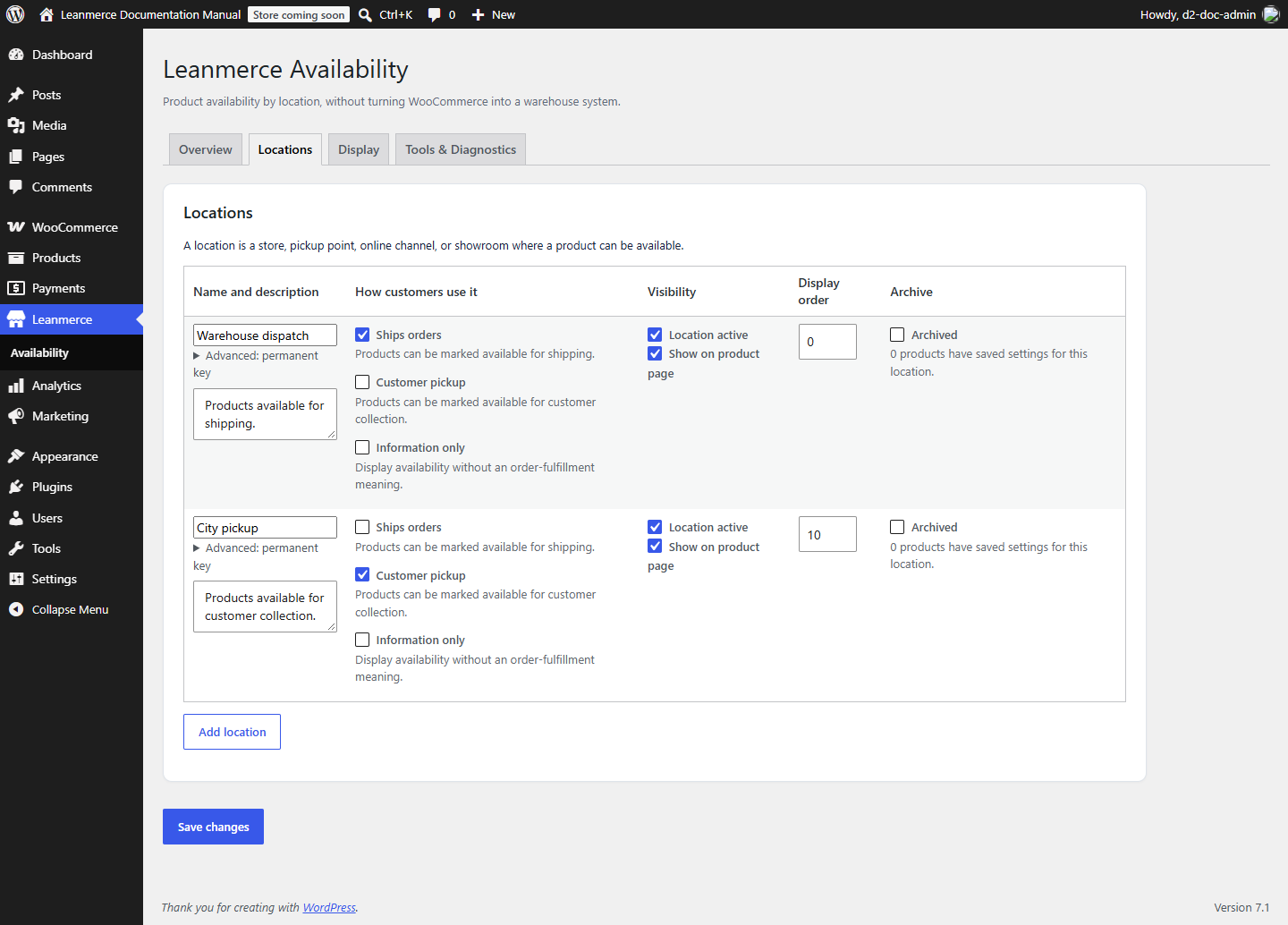
To hide a location from customers but retain it for operations, turn off Show on product page; that is not the same as making it inactive. To retire it, archive it. Archive retains assignments. Unarchive and reactivate to reuse them. Before archiving a Pro fulfillment location, review Order Methods.
Recovery: if a location is missing from product controls, check Active and Archived first. If it is absent only on the storefront, check public visibility and Storefront display.